Mouse Pad Grumpy Ghost: A Practical Guide to Perfect Sublimation Printing
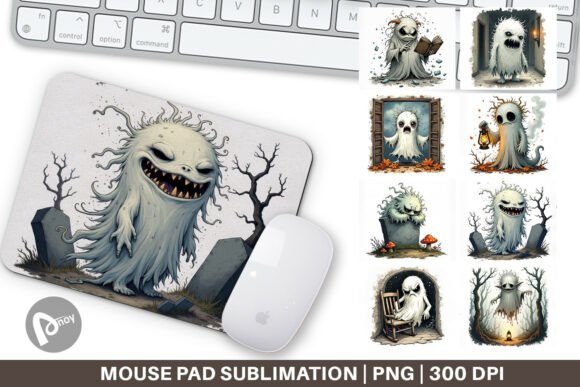
When you want a desk that reflects your personality without giving up comfort, a custom mouse pad can be the simplest upgrade. The Mouse Pad Grumpy Ghost design captures a playful, slightly grouchy character that immediately adds a unique touch to your work desk or gaming room. But turning that digital PNG file into a vibrant, durable mouse pad involves more than just hitting print. Sublimation printing is rewarding when done right, and small oversights often lead to wasted blanks, dull colors, or a finished product that just doesn't feel like the upgrade you imagined.
This guide walks through what makes the Mouse Pad Grumpy Ghost a smart choice, where well-meaning crafters and beginners frequently get tripped up, and how you can achieve a professional-looking result without frustration. The good news is that most pitfalls are avoidable once you know what to look for, and a bit of attention up front saves both time and materials.
Understanding What You’re Actually Buying
It's important to clarify from the start: the Mouse Pad Grumpy Ghost is a set of high-resolution PNG files designed specifically for sublimation. You're not getting a finished mouse pad in the mail. Each of the eight files measures 9.5 x 8.1 inches at 300 dpi, which gives you plenty of crisp detail for a standard rectangular mouse pad blank. The design is meant to be printed using a sublimation printer with sublimation ink onto special paper, then heat-pressed onto a polyester-coated surface. If you don't own or have access to a heat press and the right printer, you'll need to outsource that step. Knowing this upfront prevents disappointment and helps you plan the full project, not just the download.
The appeal is genuine: a mouse pad with a grumpy ghost character can be a conversation starter, a small morale booster, or even a low-cost product for a craft business. But the real value comes from executing the transfer properly so the image stays bright, the pad remains smooth, and the whole piece feels intentional.
The Most Common Oversights That Sabotage a Sublimation Mouse Pad
Even experienced makers slip into habits that cause reprints or ruined blanks. With a design as distinct as the Grumpy Ghost, every detail counts. Below are the errors I see most often, along with exactly what you can do to keep your final pad looking sharp.
Forgetting to Mirror the Image
It sounds basic, but in the flow of printing and pressing, it's surprisingly easy to skip. Sublimation requires the design to be printed in reverse so that when it's pressed face-down onto the blank, the image transfers correctly. If you don't mirror, your grumpy ghost ends up facing the wrong way—or any text included becomes unreadable. Before you print, open the PNG in your preferred design or print software and flip it horizontally. Make it part of your standard checklist: resize, mirror, print, press. A visual reminder near your printer can save you from a face-palm moment later.
Ignoring Color Management
The vibrant purple, moody blue, or charcoal shades you see on screen don't automatically translate to a sublimated surface. Sublimation inks behave differently from the RGB preview on your monitor. If you send the file without converting color profiles or running a test, you might end up with a washed-out, pinkish ghost instead of that rich, dark character you wanted. A practical fix: do a small test print on a compatible piece of polyester fabric or an offcut blank using the exact paper and press settings you intend to use. Adjust saturation or brightness in your software if needed. Some makers keep a reference chart of how common color combinations print on their setup. This little preparation means your Grumpy Ghost design stays moody and impactful.
Resizing Without Maintaining Proportions
Maybe your blank is slightly smaller than 9.5 x 8.1 inches, or you want to use a square coaster instead. Stretching the image to fit without locking the aspect ratio distorts the ghost, making it look squashed or stretched. Instead, open the PNG in a program that lets you scale while holding the original proportions. If the design doesn't fill the entire pad area, that's fine—a border of the blank's natural color can frame the illustration nicely. Alternatively, you can add a complementary background color inside your editing software, but always apply it at the full resolution to avoid a hard edge where the original image ended.
Choosing the Wrong Blank or Surface
The Mouse Pad Grumpy Ghost design works flawlessly on white or light-colored polyester mouse pad blanks. Sublimation ink is transparent, so any white in the design—like the ghost's eyes or teeth—will show the color of the blank itself. If you press onto a black pad, those areas turn black and the entire image becomes nearly invisible. Stick with white, off-white, or light pastel blanks for a true-to-design result. Also, confirm the blank's coating is polyester. Some budget pads use a rubber or fabric that won't bond with sublimation ink, leaving you with a faint, temporary imprint that washes away or smudges.
Relying on Household Ironing Instead of a Heat Press
A domestic iron doesn't deliver consistent temperature or pressure across the entire surface. Uneven heat leads to patchy transfers, and insufficient pressure means the ink doesn't fully embed into the coating. The ghost might end up with faint areas on one side and a crisp, dark area where you pressed harder. If a heat press isn't an option, at least use a dedicated sublimation mini-press or a clamp-style mug press accessory with a flat plate—but for a quality mouse pad, a standard flat heat press set to the manufacturer's recommended time, temperature, and pressure (typically around 385–400°F for 45–60 seconds) is your best friend. Place a clean sheet of butcher paper between the paper and the press to avoid any ghosting or color bleed onto your equipment.
What to Check Before You Press That Print Button
A few minutes of verification stops most problems before they start. First, open all eight PNG files from your Mouse Pad Grumpy Ghost download—sometimes the set includes variations with different background colors, phrases, or even a mirrored version ready to print. Pick the one that best matches your desk setup or customer request. Check the file dimensions: 9.5 x 8.1 inches gives you a small amount of bleed if your pad is exactly 9.25 x 7.75 inches—that's good, because you can trim the edges or wrap the image slightly around the pad. If your blank is a different shape, consider printing a test on plain paper to see exactly where the image falls.
Ensure your printer's printhead is clean. A nozzle check takes seconds and prevents horizontal lines across the ghost's face. Use high-quality sublimation paper—cheap paper often absorbs too much ink or does not release it fully, leaving a dull finish. And when you tape the paper to the blank, use heat-resistant tape placed exactly on the edge, avoiding the design area so you don't get light spots where the tape blocked the transfer.
Small Adjustments That Make a Big Difference in the Final Product
The difference between a homemade look and a professional product often comes down to finishing touches. If your ghost design has a dark outer edge that meets the pad's border, you might get a slight unprinted line where the paper lifted during pressing. Adding a 1/4 inch of bleed all around in your editing software—by extending the background color or pattern—gives you a safety net. This technique hides minor paper shifting and makes the final mouse pad look seamless.
After pressing, let the pad cool completely before peeling the paper. Peeling hot can cause the image to stretch or the coating to lift. Once cooled, the surface should feel identical to the rest of the pad—not raised or sticky. If it feels rough, the temperature was too high; if the image scratches off easily, pressure or time was likely insufficient. Take notes on your press settings and keep them with the blank's packaging for next time.
Realistic Examples of Better Choices
Imagine you've downloaded the design and want a gamer-aesthetic look. Your instinct might be to pair the Grumpy Ghost with a dark grey or black pad. As mentioned, that fails. A better choice: use a white pad and, if you want darker edges, manually add a dark frame or border in your design software that the ghost sits inside. That way, the colors stay vibrant and you still get a moody vibe.
Another scenario: you printed the design, pressed it, and the ghost came out slightly off-center. Instead of discarding the whole pad, use it as a "desk tester" for yourself. Note that you need better paper alignment next time. For the replacement, use a jig (a simple cardboard cutout the size of your blank) to position the paper consistently each time you press. Small consistency aids like this elevate your output, whether you're making one or fifty.
For those looking to sell these mouse pads at a market or online, presentation matters. A blurry, pixelated transfer shouts amateur. Before buying any digital design, including the Mouse Pad Grumpy Ghost, verify that the resolution is indeed 300 dpi at the intended print size. The file details provided here (9.5 x 8.1 inches at 300 dpi) give you a genuine high-quality foundation, so avoid the temptation to source a low-quality knockoff.
How a Quality Transfer Impacts Desk Comfort and Productivity
A mouse pad isn't just about looks—it directly affects how your mouse tracks and how your wrist feels after hours of work or gaming. A properly sublimated pad retains a smooth, uniform texture that optical and laser mice read accurately. A patchy or peeling transfer creates friction and reduces sensor precision, which can subtly increase hand fatigue and frustration. By taking the time to press correctly, you get a durable surface that stays vibrant and functional for a long time. The Grumpy Ghost design ends up being a part of a tool that supports your daily workflow, not just decoration.
The comfort factor also comes from pride of ownership. When you see something you made well sitting on your desk, it brings a small but real psychological lift. That might sound minor, but in a home office or gaming room where you spend many hours, these details add up. Avoiding the frustration of a botched project feeds directly into a more satisfying, productive environment.
Next time you approach a sublimation mouse pad project, keep these points in mind. The Mouse Pad Grumpy Ghost design is a fantastic starting point—distinctive, well-sized, and full of character. Give it the careful treatment it deserves, and you'll end up with a desk accessory that works as good as it looks.