Integrating the Bold Shield Vector Icons Pack into a Practical Design Workflow
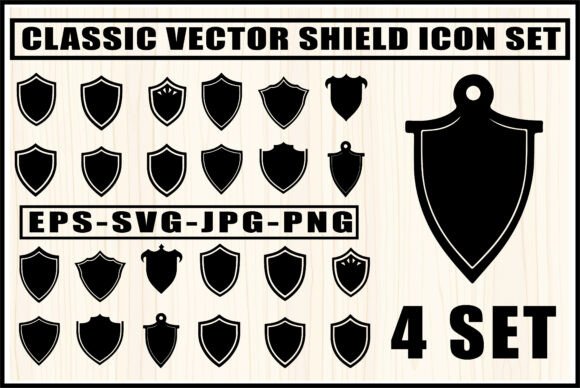
The Bold Shield Vector Icons Pack delivers a set of clean, minimalist crest shapes designed to anchor visual projects that demand strength and clarity. Rather than starting from a blank canvas, a designer or maker can pull these silhouettes directly into a logo concept, a CNC routing file, a game UI mockup, or a printed fantasy map. The asset includes four distinct styles, each prepared in four common file formats—SVG, EPS, PNG, and JPG—so that movement between software, hardware, and output types happens without friction. Because every file serves as a blank crest, the pack does not impose a pre‑made aesthetic. Instead, it provides a structured foundation that adapts to your specific finishing layers, colors, and typography decisions.
These shield bases are more than clip art; they function as a starting structure that reduces repetitive geometry work. When a freelancer needs to produce three logo variants before lunch, the pack shifts the focus from reconstructing symmetrical curves to refining proportion and negative space. When a hobbyist sets up a laser engraving file, the availability of clean SVG outlines eliminates the manual retracing that often eats into making time. The value lies in recovering those hours while preserving a level of crispness that hand‑traced graphics rarely match at high speed.
What the 4‑Style Emblem Set Includes and Why Format Variety Matters
The bundle groups four crest silhouettes that share a modern, sturdy geometry. Variation across the set means you can assign different shapes to different product lines, team divisions, or visual themes without repeating the same outline. The included file types cover distinct stages of a project:
- SVG – Scalable and lightweight, ideal for Cricut, Silhouette, and laser machines that require precise cut paths.
- EPS – Fully editable vector format for Adobe Illustrator, CorelDRAW, or Affinity Designer, letting you reshape anchor points, combine shapes, or extract sections.
- PNG – Transparent background raster format that drops directly into compositing tools, mockups, or web layouts without matte removal.
- JPG – Flat, ready‑to‑preview format for quick placement in proposals, email pitches, or initial client storyboards where file size matters.
From a planning and preparation standpoint, having all four formats eliminates conversion delays. If a team member works exclusively in raster software while another handles vector‑based manufacturing, files are already delivery‑ready. This is a small factor that compounds over multiple projects. It means the asset moves from ideation to production without the “Wait, I need this in X format” interruption that stalls momentum.
Before the Project: Using Shield Silhouettes in Discovery and Concepting
A common bottleneck in early‑stage design work is the blank screen. The Bold Shield Vector Icons Pack is especially useful during moodboarding, rapid wireframe studies, and initial client conversations. Because the crests are intentionally empty, they act as containers waiting to be filled with letterforms, monograms, or illustrative elements.
During discovery, a brand strategist might place several shield shapes into a presentation deck to gauge a client’s reaction to proportion and stance. A narrower shield communicates agility; a wider one suggests stability. The ability to test four variants without committing design resources to base geometry saves the deeper vector work for the concepts that resonate. Similarly, a game artist experimenting with guild emblems can block out UI space using PNG shields as placeholders, then later refine the selected shape into a finished icon set.
In this phase, modularity matters. Because each shield remains unadorned, the team can iterate over dozens of internal layouts—vertical stripes, horizontal ribbons, centered icons—while the outer silhouette stays consistent. This structural consistency means that when the brand or art direction changes, you swap internal elements rather than redrawing the crest from scratch.
During Active Production: Integration Across Software and Hardware
When a project enters full production, the pack shifts from a thinking tool into a tangible build asset. How it integrates depends on the medium, but the common thread is a reduction in manual foundation steps.
Logo and Brand Identity Workflows
A designer working on a modern esports or security brand identity often needs a shield mark that feels both contemporary and reliable. The Bold Shield Vector Icons Pack provides vector outlines that lock into the baseline grid quickly. From there, the typical process follows: import the EPS into Adobe Illustrator, ungroup the shape, hit a uniform stroke or negative‑space cutout, and begin layering type or mascot artwork inside the crest. Because the starting geometry is symmetrical and cleanly constructed, scaling to billboard size or shrinking to a mobile nav bar icon keeps edges crisp.
A practical observation here is that the EPS file should be opened with layers intact so that each shield variant can be excerpted without pulling unwanted nodes. Organization within the vector goes a long way: renaming artboards to match the shield style (e.g., “Wide Crest,” “Tall Crest”) saves minutes of searching when the file is reused weeks later in a different project.
CNC and Laser Cutting Preparation
For makers, the SVG format is the primary entry point. Compatibility with Cricut Design Space, LightBurn, and Silhouette Studio means you can import a shield silhouette, set cut parameters, and send the job to a laser or blade cutter. In a typical workflow, after choosing the right shield style, the user imports the SVG, verifies that no stray open paths exist, and then groups the shape with any additional cutouts—perhaps a monogram or a custom interior pattern. The pack’s crisp, minimal lines reduce the need for node cleanup, which is a known time sink in CNC prep.
An important quality‑control step happens right after import: running a quick preview or a dry‑run trace to confirm that the vector scale matches the material dimensions. Because the SVG is resolution‑independent, scaling from a 2‑inch coaster emblem to a 12‑inch wall sign introduces no degradation. This consistency eliminates a source of error that often emerges when low‑resolution reference images are converted manually.
Digital and Print Mockups for Fantasy or Gaming Art
The PNG files slide directly into Photoshop compositions, game engine UI builds, or print‑ready fantasy map layouts. Transparent backgrounds allow immediate overlay onto parchment textures, metallic backgrounds, or dark UIs without matte artifacts. When a fantasy cartographer builds a regional map, placing PNG shield markers for towns or strongholds helps establish a visual hierarchy before committing to final ink lines. Later, the EPS versions can be pulled in to create a unifoam printed legend.
Layout efficiency improves when the design tool’s smart objects or linked assets feature is used. Linking to the original PNG or SVG means that if a style revision happens (such as swapping from shield style A to style C), the update propagates across every instance. This is a minor automation that prevents manual replacement on twenty map markers.
Beyond the Single Use: Building a Reusable Asset Library
Instead of treating the shield pack as a one‑time purchase for a single client project, a practical approach is to fold the assets into a personal or team library. Organized correctly, these shield bases serve multiple projects over months or years, reducing the time you spend searching for a “neutral, professional crest shape.”
A simple folder structure helps: root directory named Shield_Crests with subfolders for each format, and within those, a consistent naming pattern like “BoldShield_StyleA_Outline.eps.” Tagging the files with descriptive metadata inside Adobe Bridge or Eagle app means you can pull up all four styles instantly when a new branding brief calls for a shield.
When the library approach is applied across a team, version control becomes important. The original files should remain untouched; any modifications get saved as derivative working files. This protects the original clean geometry and ensures that every new project starts from the same high‑quality baseline. The practice also aligns with long‑term usability thinking: an asset that stays clean and editable outlasts any one project’s particular output format.
Preparing for Final Output: Export, Delivery, and Client Handoff
The transition from design environment to final medium often introduces unexpected artifacts. The Bold Shield Vector Icons Pack helps mitigate a few common exit‑stage headaches. When you export to raster formats, starting from the vector EPS gives you control over anti‑aliasing and resolution. A 300 DPI PNG exported from the vector ensures the shield prints sharply on a business card or a T‑shirt transfer, while the same file exported at 72 DPI suits digital screens without large file sizes.
For client handoff, delivering the EPS along with a style guide snippet that shows the shield dimensions, stroke weights, and clear‑space rules gives the client a foundation they can apply consistently. If the client’s internal team works in different software, the bundled PNG and JPG versions prevent them from trying—and likely failing—to open a vector file correctly. Providing all four formats in the final delivery folder, clearly labeled, is a small gesture that reduces support emails and reinforces a professional workflow.
Maintaining Visual Consistency Across a Series
When a set of products, sub‑brands, or gaming factions needs a unified shield treatment, the pack’s four‑style set provides variation within a recognizable family. The silhouettes share a similar design language—minimalist lines, confident weight distribution—so placing them side by side creates coherence, not chaos. A brand manager overseeing a corporate event series might assign one shield style to each event location while keeping the inner layout consistent, resulting in a poster series that feels related yet distinct.
In a publishing context, the shields can function as chapter markers or section dividers in a fantasy book interior. Assigning each major house or guild a specific shield silhouette from the set lets the reader visually navigate the book without heavy iconography. The JPG versions make quick compositing into InDesign or Affinity Publisher straightforward, while the SVG versions remain available for high‑resolution interior print when the printer requires vector output.
Planning for Scalability and Future Edits
The way an asset is used today often dictates how it can be reused tomorrow. The Bold Shield Vector Icons Pack is built on vectors, which means any future edit—thickening the outline, adding a gradient, combining two shields into a compound shape—starts from a lossless source. When a client returns two years later for a brand refresh, the EPS files open without pixelation, ready for re‑proportioning. This future‑proofing factor is particularly relevant for agencies that maintain long‑term client relationships and for product designers who iterate over seasons.
A practical checkpoint: schedule a recurring quarterly review of your master asset folder. Remove redundant copies and note which shield styles have been most frequently used. This insight can inform your next asset purchase or direct your focus to mastering the shapes that align with real output needs. It’s a minor habit that keeps your creative toolkit lean and aligned with actual demand.
The Bold Shield Vector Icons Pack ultimately serves as a structural resource that fits into concepting, active building, production handoff, and archival. Whether you are assembling a laser‑etched awards plaque, crafting a Twitch overlay for a tournament, or developing a cohesive family of product labels, these shield silhouettes keep your work grounded in solid geometry while letting your applied graphics do the talking.